Bhu Naksha 2026 – Check & Download Your Land Map, All States
Bhu Naksha (भू नक्शा) is the online cadastral map maintained by each Indian state’s revenue department on NIC software, showing a plot’s boundaries, shape, area, and khasra number. This page routes you to your state’s official portal and shows you how to use it. It’s an independent help resource, not a government website.
Find your state’s official Bhu Naksha portal
Pick your state below. Every link goes to the official government portal directly — no redirects. Some states use a different local name for the same system, shown alongside. For the exact steps on each portal, open that state’s step-by-step guide.
Official Bhu Naksha land-map portals, by state
| State | Portal / local name | Official portal | Login to view? | PDF / map |
|---|---|---|---|---|
| Uttar Pradesh | Bhu Naksha UP | upbhunaksha.gov.in↗ | No | Yes (Map Report) |
| Chhattisgarh | Bhuiyan / Bhu Naksha | bhunaksha.cg.nic.in↗ | No | Yes; Google / Bing base-map |
| Rajasthan | Bhu Naksha / Apna Khata | bhunaksha.rajasthan.gov.in↗ | No | Yes (Nakal → PDF) |
| Bihar | Bhu Naksha Bihar | bhunaksha.bihar.gov.in↗ | No | Yes (Survey Type + Map Instance) |
| Assam | Bhu Naksha Assam | bhunaksha.assam.gov.in↗ | No | Yes (Map Report) |
| Kerala | e-Maps Kerala (BhuNaksha) | emaps.kerala.gov.in/bhunaksha↗ | No | Yes |
| Punjab | Jamabandi Punjab | jamabandi.punjab.gov.in↗ | No (login for official services) | Cadastral map module |
| Madhya Pradesh | MP Bhulekh (WebGIS 2.0) | mpbhulekh.gov.in↗ | Free to view; login for certified copy | View free; certified paid |
| Jharkhand | Jharbhunaksha | jharbhunaksha.jharkhand.gov.in↗ | No | Yes (District → Circle → Halka → Mouza → Sheet) |
| Maharashtra | Maha Bhu Naksha | mahabhunakasha.mahabhumi.gov.in↗ | No | Yes (Rural / Urban → Map Report) |
| Odisha | Bhulekh Odisha (Map View) | bhulekh.ori.nic.in↗ | No | Map View / village maps |
| Haryana | Jamabandi Haryana (Cadastral Maps) | jamabandi.nic.in↗ | No | View Maps module |
| Uttarakhand | Bhu Naksha UK | bhunaksha.uk.gov.in↗ | No | Yes (Khasra search) |
| Telangana | Dharani / Bhu Bharati (Dharani being replaced) | dharani.telangana.gov.in↗ | Free to view; login for transactions | Tippon PDF |
| Himachal Pradesh | Bhu Naksha HP (pairs with HimBhoomi) | bhunakshahp.nic.in↗ | No | Yes (Map Report → Show PDF) |
What if my state isn’t a standard Bhu Naksha portal?
A few states route land maps through differently-named systems. Odisha uses Bhulekh Odisha’s Map View, Telangana uses Dharani, and Andhra Pradesh uses Meebhoomi’s FMB sketch. Punjab and Haryana serve maps through their Jamabandi portals. Open the matching link above for your state.
How to view and download your Bhu Naksha map
The basic flow is the same on most state portals:
- Open your state’s official Bhu Naksha portal.
- Select your District, then तहसील (tehsil/taluka), then मौज़ा (village). Jharkhand and Bihar use a different selection order — check those state guides.
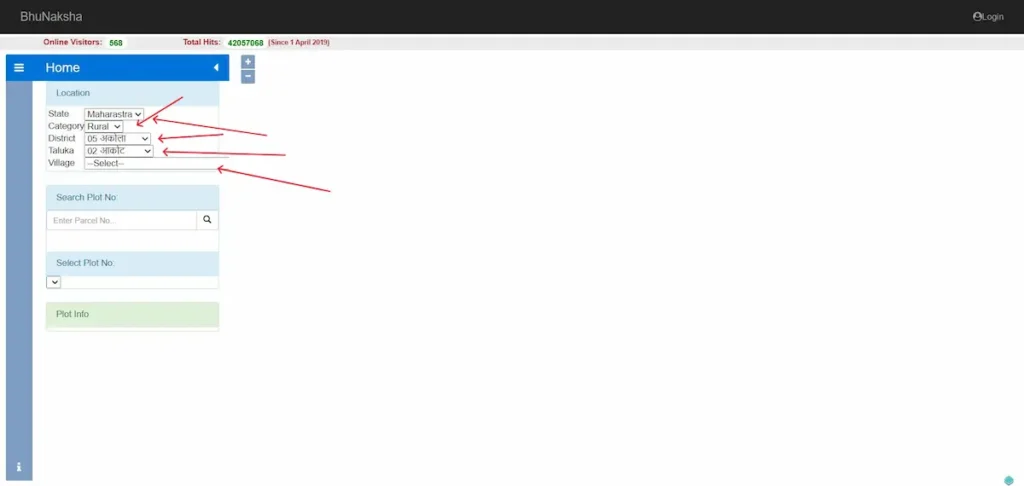
- Click your plot on the map, or enter your खसरा (khasra) or plot number.
- The map highlights your parcel and shows its boundaries, area, and plot number.

- Open “Map Report,” then “Show Report PDF” to download or print it.
Two things worth knowing before you rely on it. Viewing and the basic PDF are free, but this copy is for reference only. For any legal use — registration, a loan, or court — you need the certified, digitally signed copy issued by the revenue department, which usually requires login and a small fee.
Can you see your plot on a satellite or Google map?
The standard Bhu Naksha map is a vector cadastral map — boundary lines, not a photograph. That’s why a search for a satellite or GPS land map often disappoints: the portal draws your plot’s shape, it doesn’t show the ground.
Some states bridge that gap. Chhattisgarh’s portal includes a Google Map and Bing Maps base-layer option, letting you place your parcel boundary over satellite imagery to see how it sits against roads, fields, and neighbouring plots. Availability varies by state, so look for a “Base Map” or viewing-options menu on your portal. Where it exists, it’s the closest you’ll get to matching the official boundary with the real ground.
What the lines and labels on your map mean
Your map shows a few core things: the plot or khasra number identifying the parcel, the boundary lines marking its shape, and its area. Many maps also label land use — बंजर (barren), तालाब (pond), आबादी (inhabited), चकरोड (cart road).
One limit to keep in mind. Bhu Naksha shows the spatial picture — where the parcel is and how big. It does not confirm who owns it. Owner name, khatauni, the record of rights, and mutation status live in your state’s Bhulekh record, not the map. Use both together: the map for location and shape, Bhulekh for ownership.
Bhu Naksha vs Bhulekh: Which one do you need?
These two answer different questions about the same plot. Bhu Naksha is the map — it shows the parcel’s boundaries, shape, area, and plot or khasra number. Bhulekh, also called Jamabandi or the Record of Rights, is the written record — it shows the owner’s name, the khatauni, and mutation status.
Want to know where the land sits and how big it is? Use Bhu Naksha. Want to know who owns it? Use Bhulekh. One more practical point: searching by owner name usually works on the Bhulekh side, not the map. Most Bhu Naksha portals find a plot by khasra number, not by name.
Common problems and how to fix them
- Portal won’t load. These run on state servers and go down at busy times. Try again later, switch browsers, or open it on mobile data instead of wifi.
- Your plot or khasra isn’t on the map. The parcel may not be digitised or updated yet. This is the most common issue, and the portal can’t fix it from your end.
- Owner name is outdated, or the boundary looks wrong. A pending mutation or an un-synced correction is usually the cause.
For the last three, the route is the same: visit your local तहसील or पटवारी office and file a map-correction application with your sale deed and khasra copy. Only the Revenue Department can change the official record.
One caution if you’re buying. A mismatch — a missing access road, a boundary that overlaps the neighbour — is a red flag. Check the land physically and consult a lawyer before you pay.
Frequently asked questions
Is Bhu Naksha the same as Bhulekh?
No. Bhu Naksha is the cadastral map showing a plot’s boundaries, shape and area. Bhulekh — also called Jamabandi or Record of Rights — is the textual land record showing owner name, khatauni and mutation status. To check ownership by name, use the Bhulekh portal, not Bhu Naksha.
Is Bhu Naksha free?
Yes. Viewing your land map on any state’s official Bhu Naksha portal is free and usually needs no login. Some states charge a small fee and require registration only for a certified, digitally-signed copy that is legally valid for banks, courts and registration.
Is a downloaded Bhu Naksha legally valid?
A map you download yourself is for reference only. For legal use — property registration, loan, or court — you need a certified copy issued by the state Revenue Department, which is digitally signed and, in most states, requires a paid request through the official portal.
My plot is not showing on Bhu Naksha — what should I do?
If your plot or khasra number doesn’t appear on the map, the records may not be digitised or updated yet. Contact your local tehsil or patwari office and submit a map-correction application with your sale deed and khasra copy. Only the Revenue Department can correct the map.
Can I download my village map as a PDF?
Yes. Once your plot is on screen, open “Map Report” and then “Show Report PDF” to save or print the village or plot map. The free version is for reference; a certified copy needs an official request.
How do I find my khasra or plot number?
It’s on your sale deed, property tax receipt, or earlier land papers. If you don’t have it, your local patwari office can trace it from the owner name and village.
About this site & how we verify
This is an independent help resource for finding and using India’s official Bhu Naksha land-map portals. It is not a government website and has no connection to any state revenue department or the National Informatics Centre.
Every portal link here is checked against the official government source before publishing, and each state section shows the date it was last verified. Government portals change their URLs and layouts without notice, so always confirm details on the official site itself.